
Comparison
BidBuild vs JobTread
Both platforms set out to run a contractor's operation end to end — estimating, proposals, scheduling, job costing and the paperwork in between. Neither is the right answer for everyone. The honest deciding factors are your trade, how your money actually moves, how many people need logins, how much implementation you can absorb and what you can spend. This page lays out what we can verify about each, and where you should ask the vendor directly.
At a glance
JobTread rows are drawn from JobTread's own public pages, accessed 4 September 2026. Where a fact could not be verified publicly, the row says so instead of guessing.
Clear advantage Comparable — neither wins Weaker on this row
Pricing model
BidBuild
Published tiers: Free plan, Essentials $399/mo ($3,990/yr), Professional $699/mo ($6,990/yr), Enterprise on request.
JobTread
Published: $199/month base, with 20% off an annual subscription. No contract and no setup fees, and every feature is included rather than split across tiers (jobtread.com/pricing).
Users and seats
BidBuild
Unlimited users on every plan, including Free. Seats are not a billing lever.
JobTread
The base price includes the first internal user; additional internal users start at $20/month each, with tiered breaks as the team grows (jobtread.com/pricing).
Estimating and proposals
BidBuild
Proposal builder with text, photos, video and embedded content, plus catalog-driven line items clients can see with photos and descriptions.
JobTread
Estimating and proposals are core to the product and included for every customer (jobtread.com).
Job costing
BidBuild
Costs tracked against the job as bills and POs land, with margin visible while the job is still running.
JobTread
Budget tooling tracks costs, markup and margin with real-time indicators and projected profit (jobtread.com).
Contingency and margin visibility
BidBuild
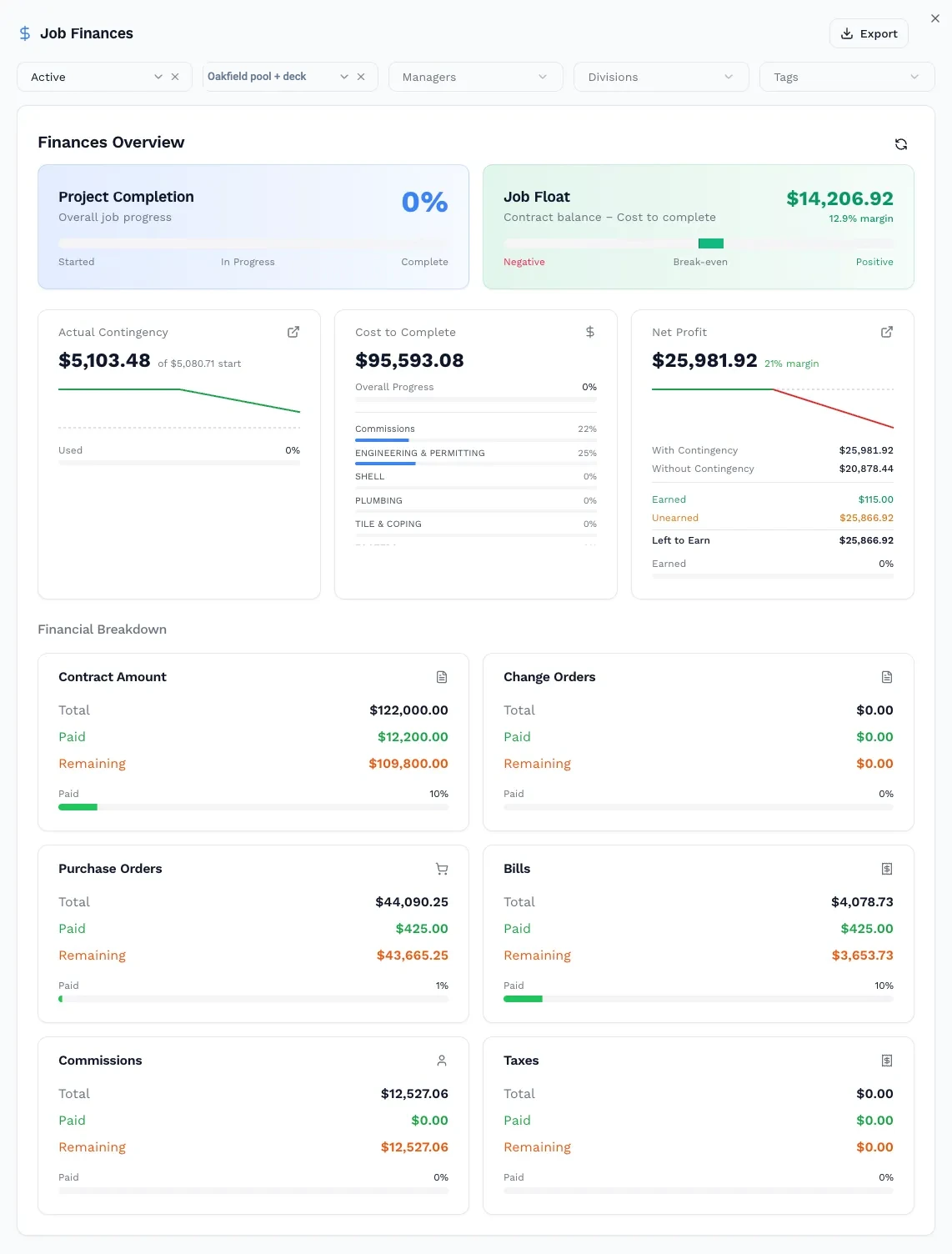
Contingency is a live swing on every job — it moves as real costs come in, rather than a percentage set once at quote time.
JobTread
Contingency is generally handled as a budget line you manage yourself inside the budget. Confirm with vendor whether a dedicated live contingency object now exists.
Purchase orders and bills
BidBuild
POs raised against the job; supplier bills entered against the PO and carried through to QuickBooks ready to pay.
JobTread
Purchase orders, work orders and bills are part of the platform, including vendor-side approval and signing (jobtread.com).
Client portal
BidBuild
Client portal included — clients see quoted products with photos, descriptions and catalog detail.
JobTread
Customer portal plus a separate vendor and subcontractor portal for bids, POs, work orders and document tracking (jobtread.com).
QuickBooks
BidBuild
Bills and job costs flow to QuickBooks for payment and reconciliation.
JobTread
Two-way QuickBooks Online sync covering invoices, bills, payments, customers, vendors and cost codes (jobtread.com). Confirm QuickBooks Desktop support with the vendor.
Supplier catalog
BidBuild
Heritage Pool Products catalog imported with synced pricing, plus BidBuild Marketplace access on every plan including Free.
JobTread
Live pricing from retail and distribution partners inside estimates, and a global catalog populated by partner suppliers (jobtread.com).
Financing workflow
BidBuild
VistaFi integration — clients apply for financing straight from a proposal and application status is attached to the lead.
JobTread
Confirm with vendor. No equivalent embedded financing application workflow was found on public pages.
AI and connectivity
BidBuild
BidBuild IQ credits included — 250 a month on Essentials and 1,000 on Professional, rolling over up to twice the monthly allotment.
JobTread
AI support across the product, and an AI connector that lets you point your own AI tool at your JobTread data (jobtread.com).
Best-fit customer
BidBuild
Pool, spa and outdoor-living contractors, and teams that want live contingency control and unlimited seats.
JobTread
General contractors and remodelers wanting one broad, everything-included platform with a well-established training and community programme.
Only in BidBuild
Capabilities we ship that JobTread has no equivalent for. The table above is the fair fight; these are the gaps.
- Scenes
Client-facing presentations assembled from your own photos and product data: a before-and-after slider, hotspots pinned to the detail that justifies the upgrade, and a walkthrough video in the same place. One link, no attachment, works on a phone.
JobTread: Customer Portals carry files, photos and videos on the job, but there is no tool for assembling them into a presentation you send to win the work.
- Questionnaires
Structured, per-trade intake that turns a site visit into a priced proposal from your own catalog — the answers select the line items rather than just landing in a notes field.
JobTread: Ships a Forms module for structured data capture. Nothing published connects form answers to catalog-priced proposal lines.
- Inventory, assets and equipment
Stock, assets and equipment logged and tracked against the job, so what you already own is visible before you buy it again.
JobTread: Neither inventory, stock nor equipment tracking appears among the 31 modules JobTread lists across Sales & Estimating, Project Management, Job Finances and Customer Experience.
- Commissions
Salesperson commission tracked in the same job ledger as purchase orders, bills and change orders, so the cost of winning the job sits against the job that carries it.
JobTread: No commission module appears in the published feature list.
- Intranet Hub
A company-wide hub for internal resources — the policies, links and reference material staff need — maintained by you inside the same system that runs the jobs.
JobTread: Files, Photos & Videos are organised against jobs. No company-wide staff resource hub appears in the published feature list.
Checked against the module list JobTread publishes at jobtread.com/features (accessed 12 September 2026), which enumerates 31 modules in four groups. Absence from that list is what is claimed here, not absence from the product. JobTread does ship Warranty Management, POs & Work Orders and Forms, so service requests, work orders and structured data capture are deliberately not listed as gaps.
What BidBuild is built to solve
BidBuild was built around one chain of events: the proposal a client signs, the products that proposal commits you to buying, the purchase orders and supplier bills that follow, and the margin left over once all of it lands. Most contractors lose money in the gaps between those steps — a selection changes, a supplier price moves, a bill arrives three weeks late, and the job's real profit is only known at closeout.
A proposal in BidBuild is built from a live catalog rather than a typed list. Contractors running the Heritage Pool Products integration import their catalog with synced pricing and buy straight from Heritage through job purchase orders, then watch delivery and billing status without leaving the job. When Heritage bills, the bill is entered against the job and is ready to be sent to QuickBooks to be paid.
Financing sits in the same flow. The VistaFi integration lets a client apply from the proposal you sent, and the application and its status attach to the lead so nobody has to chase a loan officer for an update. And because every product and service on a job carries a contingency, the cushion is a number that moves with real costs instead of a percentage nobody revisits.
You can see the whole platform on the platform page, the plan structure on pricing, and the trade-specific version of this workflow on the pool contractor page.
Who should choose each
BidBuild may fit best if…
- You build pools, spas or outdoor living spaces and want workflows shaped around that trade.
- You want contingency and margin visible while the job is running, not reconstructed at closeout.
- You buy through Heritage and want catalog pricing, purchase orders and bills in one chain.
- You offer client financing and want applications to start inside the proposal.
- Your headcount is large or growing and per-seat pricing is the line item you dislike most.
- You want to start on a free plan and pay when you begin sending proposals.
JobTread may fit best if…
- You are a general contractor or remodeler and want one broad platform rather than a trade-shaped one.
- A small internal team means per-user pricing lands below a flat plan for you.
- You want every feature included on one published price with no tiers to compare.
- Subcontractor and vendor portal workflows — bids, POs, document tracking — are central to your week.
- An established training programme and contractor community matter to how you roll software out.
- You prefer connecting your own AI tool to your data over vendor-supplied credits.
A switching and evaluation checklist
Use this with either vendor, including us. It is an evaluation checklist, not a promise: BidBuild does not claim to migrate your JobTread data automatically, and anything a vendor will do for you should be written into the agreement rather than assumed from a demo.
- Export contacts, vendors, cost catalog, active jobs, document templates and the reports you actually use.
- Map your job phases and cost codes to the new system before anyone builds an estimate in it.
- Validate the QuickBooks data flow with both vendors against your own chart of accounts.
- Run one real job end to end: estimate, proposal, purchase order, supplier bill, payment.
- Decide what happens to jobs already in flight — finish them where they are, or move them mid-stream.
- Check what your clients, vendors and subcontractors need to see, and who pays for that access.
- Get implementation scope, data ownership and export rights, support response and contract terms in writing.
Frequently asked questions
Is BidBuild a direct replacement for JobTread?
For most residential contractor workflows the overlap is high: estimating, proposals, job costing, purchase orders, bills, scheduling and a client portal exist on both. The differences show up in packaging — BidBuild charges by plan with unlimited seats, treats contingency as a live number on every job, and ships pool and outdoor-living workflows including Heritage catalog purchasing and VistaFi financing. Whether that is a replacement depends on which of those you rely on today.
How does pricing actually compare?
JobTread publishes $199/month with the first internal user included, additional internal users starting at $20/month, and 20% off annual billing. BidBuild publishes a Free plan, Essentials at $399/month or $3,990/year, Professional at $699/month or $6,990/year, and Enterprise on request, with unlimited users on every plan. Which is cheaper depends almost entirely on headcount, so price both against your real seat count.
What does 'live contingency tracking' mean in practice?
Instead of adding a fixed percentage at quote time and finding out at closeout whether it held, the contingency on a BidBuild job moves as actual costs post against it. You can see the remaining cushion while there is still time to change a selection, re-quote a supplier or raise a change order.
Will my QuickBooks data still work if I switch?
Both platforms integrate with QuickBooks Online, but the objects that sync and the direction they sync differ. Ask each vendor to demonstrate the exact flow with your chart of accounts and cost codes before committing, and confirm QuickBooks Desktop support directly if you run Desktop.
Can I move my existing jobs, contacts and cost catalog over?
Plan on exporting contacts, vendors, cost catalog, templates and active job data yourself and validating the import with the vendor. We do not claim automatic migration from JobTread — ask both vendors, in writing, what they will import for you and what remains your responsibility.
Do clients and subcontractors get their own access?
BidBuild includes a client portal where homeowners see quoted products with photos, descriptions and catalog detail. JobTread publishes both a customer portal and a separate vendor and subcontractor portal. If subcontractor-facing bidding and document tracking is central to how you work, evaluate that portal side by side.
Is there a free way to try BidBuild?
Yes. The Free plan is a plan rather than a trial — lead capture, financing applications, Marketplace access and a landing page stay available with no card. You move up when you need to price and send proposals.
How current are the JobTread facts on this page?
Every JobTread claim here comes from JobTread's own public pages, accessed 4 September 2026, and the primary links are listed in the sources note below. Vendors change pricing and features without notice, so verify anything decision-critical on their site before you sign.
Sources checked
JobTread details on this page were taken from JobTread's own public pages, accessed 4 September 2026. Pricing and features change — verify anything decision-critical directly with the vendor.
Last updated 4 September 2026.
Compare it against your own numbers
Start on the free plan and price a real job, or tell us what you build and we'll walk the proposal-to-bill workflow with you. No card required to start.